Dear users!
In case of errors when working with NCALayer, we recommend reinstalling it from the website. pki.gov.kz
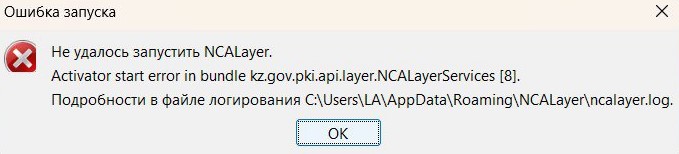
In case of errors when working with NCALayer, we recommend reinstalling it from the website. pki.gov.kz
If you have received a message about the release of electronic digital signature (EDS) keys, but you have not released them yourself, we recommend that you:
In case of reasonable suspicion of compromising the EDS keys, contact Information Security Committee of the Ministry of Digital Development, Innovation and Aerospace Industry of the Republic of Kazakhstan.
We kindly ask you to follow information security measures when working with your digital signature (EDS) keys:
• Do not share your EDS keys with third parties. Unauthorized use of your keys may result in unlawful actions being performed on your behalf.
• If you suspect that your keys have been compromised or used illegally, immediately revoke them through the User’s Personal Account on the pki.gov.kz website or via a PSC (Public Service Center) operator.
In the Personal Account, you can view all of your keys (active, revoked, and expired) and revoke them if necessary.
Any unauthorized access to your EDS is a potential risk of compromise.
If you encounter an error in NCALayer, please follow these steps:
1. Locate the Finder system application in the bottom panel (Dock).
2. Right-click (or tap with two fingers) on the Finder icon and select “Go to Folder…”.
3. Enter the following path: /Library/Application Support/ and press Return (Enter).
4. In the opened folder, find the NCALayer directory and move it to the Trash.
5. Quit NCALayer:
• on the top menu bar, find the NCALayer icon,
• select “Quit”.
6. Restart the NCALayer application.
Since June 28, 2025, new rules have come into force: only the owner can receive the keys of the NTS RK EDS — registration through a trusted person is not allowed.
The main way is remotely via pki.gov.kz or eGov.kz using biometric identification. Up to 5 attempts are provided for passing biometrics. In case of their unsuccessful completion, you can contact the self-service sector in the PSC to issue or reissue EDS keys.
When working in self-service sectors, follow the safety rules.:
The EDS keys must be kept under your full control. Any unauthorized access to them means the risk of compromise. It is important not only to use them for their intended purpose, but also to strictly control exactly where they are stored and who has access to them. Any unauthorized access to EDS is a risk of compromising them.